Cookstash — Bring all those cooking ideas into one place
Case study focus
The Cookstash project explored how a product idea could be transformed into a usable experience through an end-to-end product design process—from ideation and concept development through interaction design and coded prototyping.
This case study focuses on how I translated an initial product opportunity into a structured product experience, exploring ideas quickly, defining the interaction model, and iterating from design concepts to a functional prototype.
ROLE AND CONTRIBUTION
Product Designer
Problem Framing · Ideation · Information Architecture
Interaction Design · Code-based Prototyping
Build & Deploy
PLATFORMS
Web App
INDUSTRY
Consumer Food & Meal Planning
What is Cookstash?
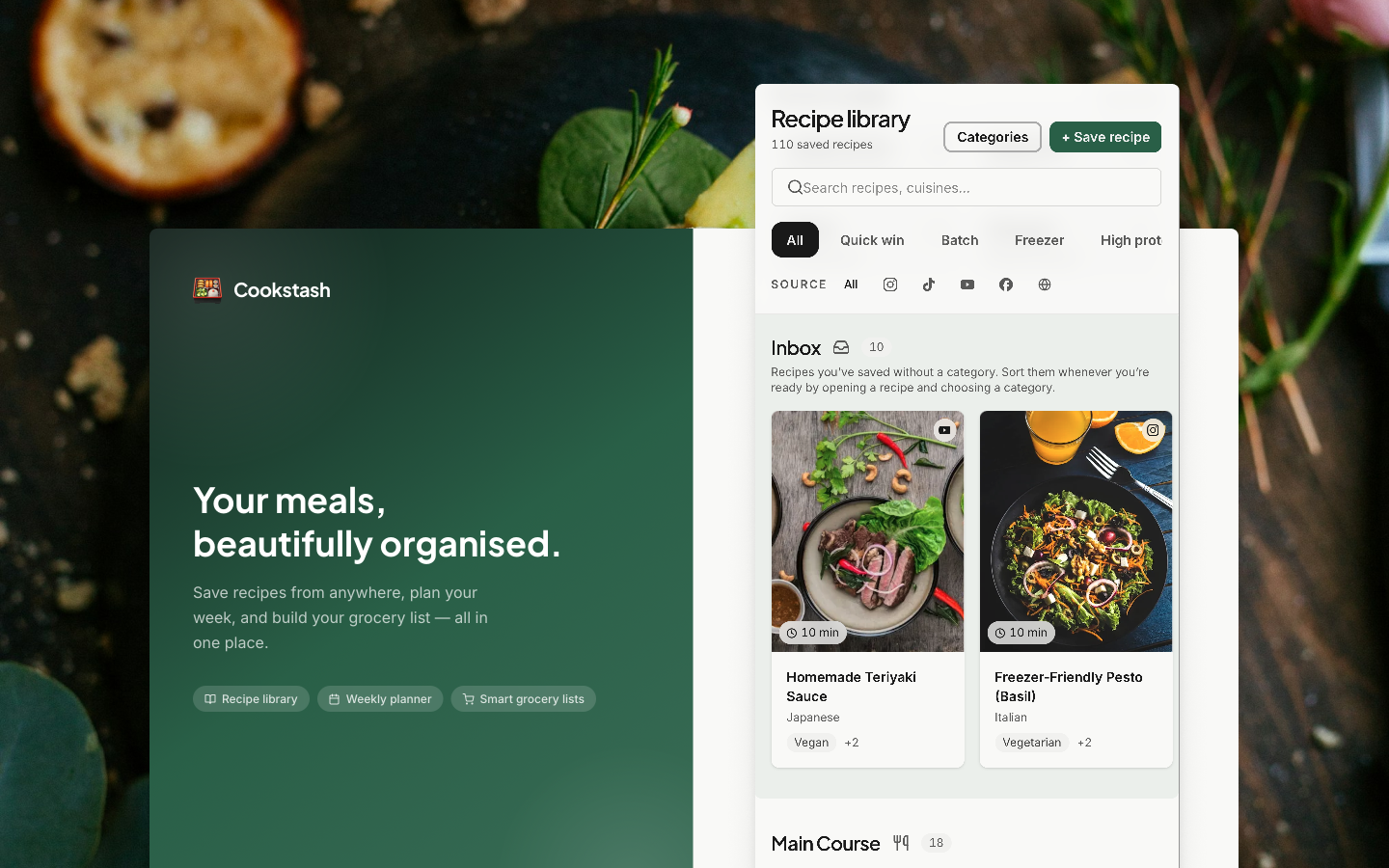
Cookstash is a personal cooking content hub that brings recipes from social platforms into one organized place. Users can save cooking videos, organize them in their recipe library, and turn them into meal or occasion plans.
From inspiration to meals, Cookstash connects the journey:
Save → Organize → Plan → Shop → Share.
Frame the opportunity
The Opportunity
Short-form video has transformed how people consume information. A simple, engaging cooking video can make a recipe easier to understand than long, text-heavy instructions, making cooking feel more accessible, natural, and enjoyable.
This creates an opportunity to turn everyday inspiration into healthier, more intentional cooking habits.
Problem
The problem wasn't discovery anymore—it was turning inspiration into action. Cooking inspirations are scattered across social platforms, making it difficult to organize, revisit it later.
Hypothesis
By connecting recipe discovery, personal collection, meal planning, grocery preparation, and sharing in one continuous experience, Cookstash can turn scattered cooking inspiration into something people can organize, plan, and act on in their everyday lives.
Opportunity Validation
" Is this hypothesis worth pursuing? "
Competitive analysis, quickly validate the opportunity
Goal
Understand how existing products help people discover, save, organize, and act on cooking inspiration, and identify where Cookstash could differentiate.
Process
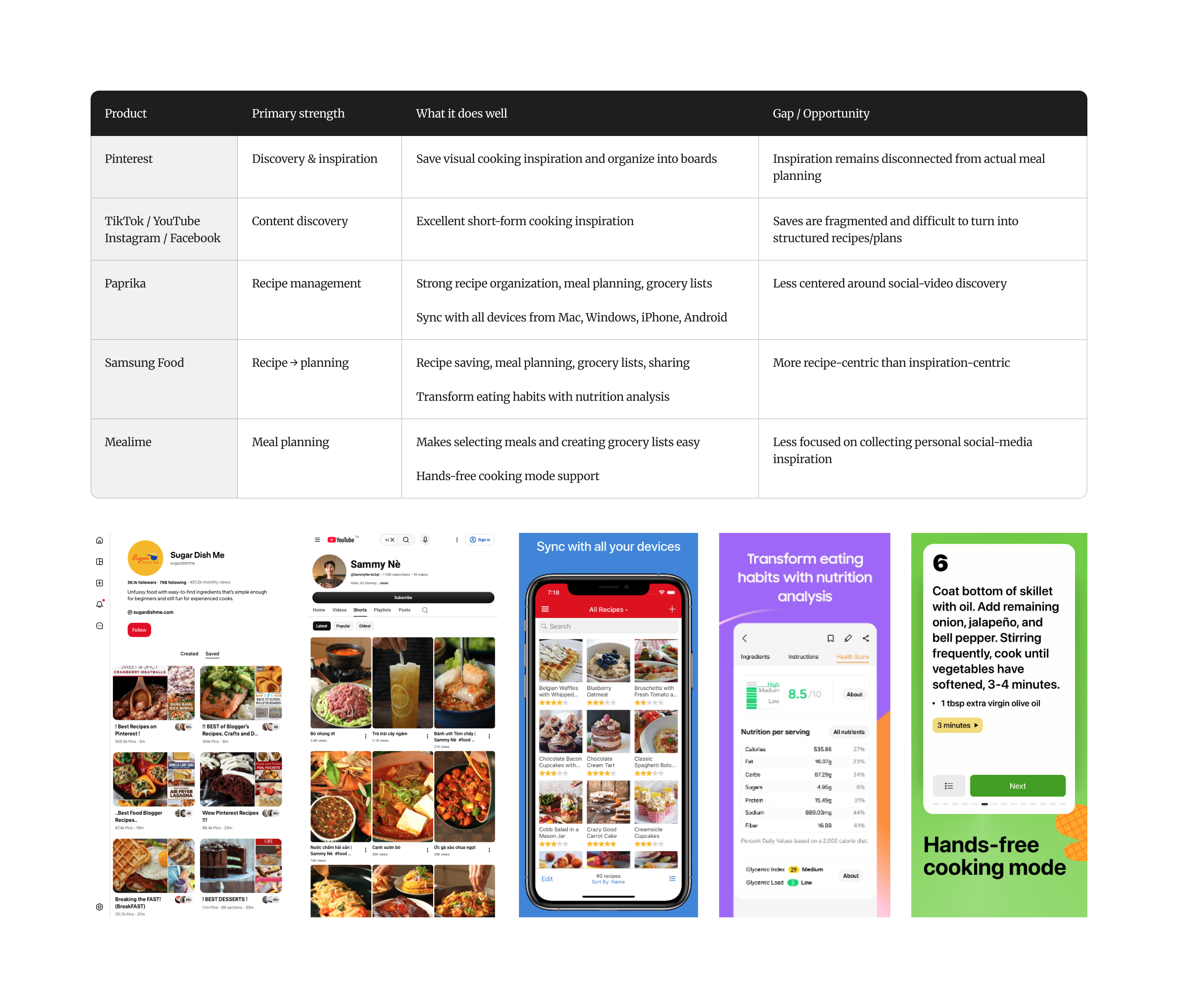
Reviewed a focused set of products across the cooking journey — social platforms, recipe libraries, and meal-planning tools — comparing how each supports discovery → saving → organizing → planning → shopping → sharing.
Findings
Similar flows across products — Most follow a familiar journey from recipe saving to planning and grocery management, with only minor differences in feature support.
Similar recipe experience — Most rely on structured, text-based recipes and in-product libraries, creating a largely similar experience across the category.
Opportunity
Discovered incidentally. Saved intentionally. Cookstash turns spontaneous cooking inspiration into a personal, video-first recipe collection.
Define the product
Information model
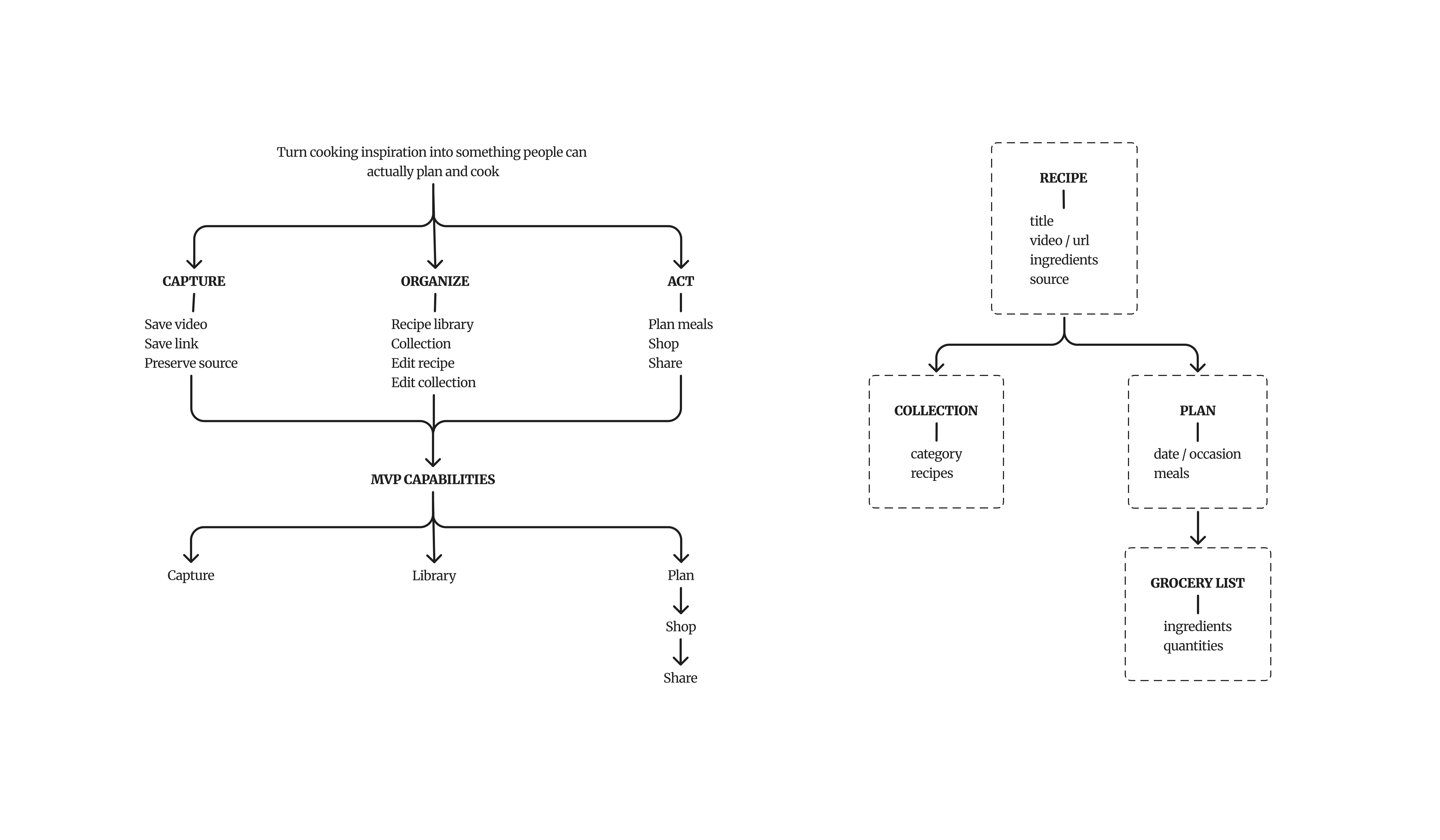
Recipe is the core object. Collections help users organize recipes, while Plans turn them into actionable meals and Grocery Lists support preparation.
Scope & Prioritization
MVP Experience
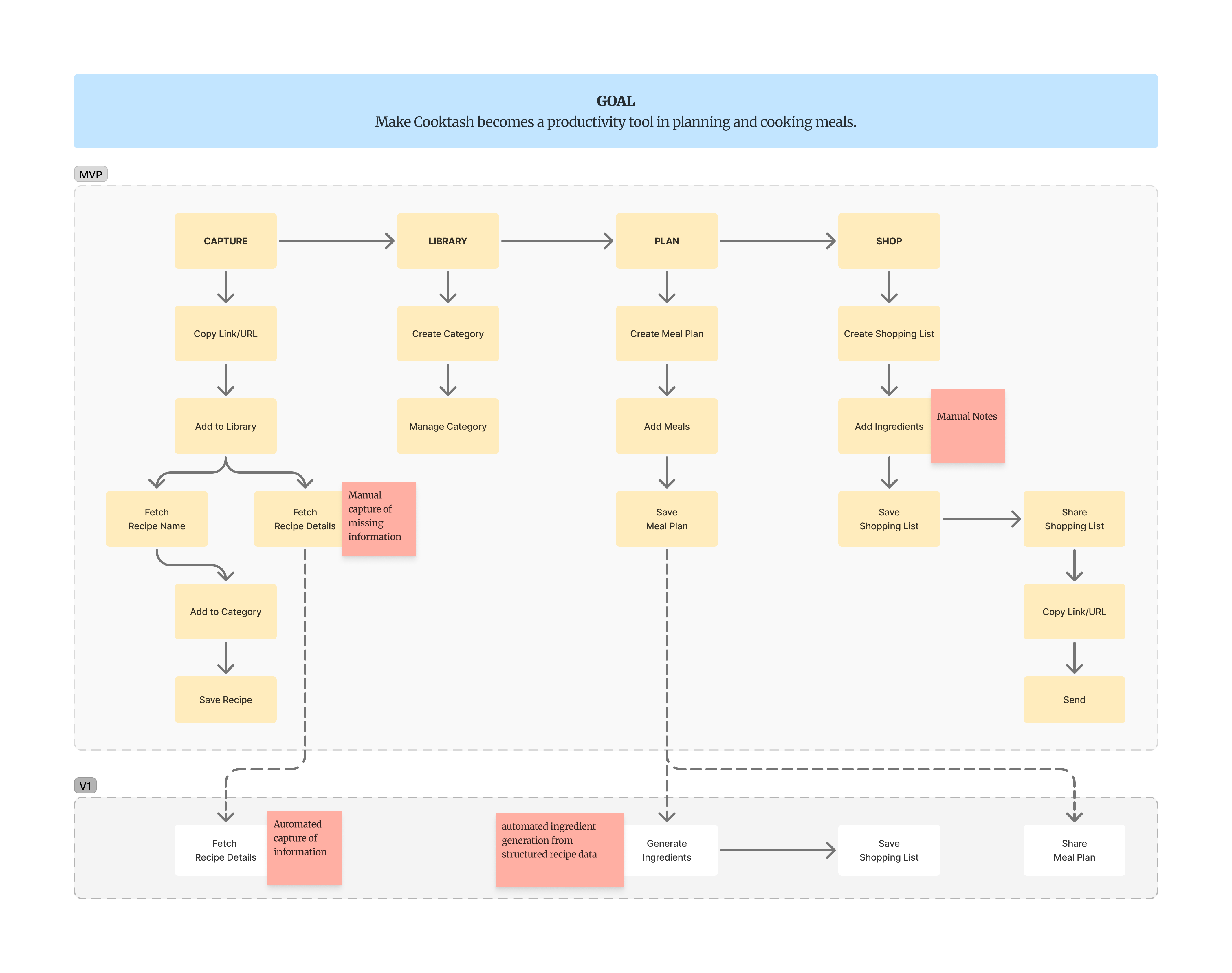
I focused the MVP on Capture, Library, Plan, and Shop because together they form the minimum end-to-end journey from discovering a recipe to turning it into an actionable meal plan and shopping list.
Trade-off
Ingredient generation was intentionally deferred from the MVP: Automatic ingredient extraction was deferred because social-media content is often incomplete or unstructured. Instead, the MVP uses a lightweight Note capability to capture missing information.
V1: Generate consolidated ingredients from recipes selected in a meal plan, using more reliable recipe data.
User journey
Where does the painpoints come from?
Mapping the journey from "sees a recipe" to "shops ingredients" surfaced two moments where existing tools typically lose people: the save itself, and the transition from inspiration to a usable plan. Those two moments became the critical decisions the design had to get right.
Save a recipe for later cook
The spontaneous save. One recipe, found on social, cooked another day.
Scrolling Facebook, TikTok, or Instagram, she finds a recipe with clear, easy-to-follow steps.
Inspired — "this looks doable."
Taps save on the reel, assuming she'll make it soon.
Confident, low effort.
Saves pile up across Facebook, TikTok, and Instagram with no shared home.
Unaware the pile is forming.
On the weekend she wants the beef salad she saved on a Facebook reel.
Motivated, ready to cook.
Opens Facebook, searches the author's name, goes to their page, then searches again inside their reels to re-find it.
Frustrated — a multi-step hunt for one dish.
Follows the instructions and makes the meal.
Satisfied — but the path there was the hard part.
Scrolling Facebook, TikTok, or Instagram, she finds a recipe with clear, easy-to-follow steps.
Inspired — "this looks doable."
Taps save on the reel, assuming she'll make it soon.
Confident, low effort.
Saves pile up across Facebook, TikTok, and Instagram with no shared home.
Unaware the pile is forming.
On the weekend she wants the beef salad she saved on a Facebook reel.
Motivated, ready to cook.
Opens Facebook, searches the author's name, goes to their page, then searches again inside their reels to re-find it.
Frustrated — a multi-step hunt for one dish.
Follows the instructions and makes the meal.
Satisfied — but the path there was the hard part.
Plan a meal
The deliberate planner. Existing apps rejected, so she built her own workaround.
Skips meal-prep apps — they suggest recipes that don't match her taste, ingredients, or cooking culture.
Distrustful — "this isn't food I'd actually make."
Opens the Notes app on iPhone — the fastest tool — starts a new note for the week.
Resourceful, pragmatic.
Names the plan, uses table format to schedule dishes. Create a checklist, list out every grocery item, sort by category.
In control — but it's all manual typing.
Shops from the checklist on the weekend, comes home, and preps the meals.
Accomplished.
Next week she starts a brand-new note and create a new plan — no history, no saved preferences, no single source.
Resigned to redoing it all.
Her Notes lists pipe up, each list contain long plain text, more days plan, more type.
Unmotivated to keep doing.
Skips meal-prep apps — they suggest recipes that don't match her taste, ingredients, or cooking culture.
Distrustful — "this isn't food I'd actually make."
Opens the Notes app on iPhone — the fastest tool — starts a new note for the week.
Resourceful, pragmatic.
Names the plan, uses table format to schedule dishes. Create a checklist, list out every grocery item, sort by category.
In control — but it's all manual typing.
Shops from the checklist on the weekend, comes home, and preps the meals.
Accomplished.
Next week she starts a brand-new note and create a new plan — no history, no saved preferences, no single source.
Resigned to redoing it all.
Her Notes lists pipe up, each list contain long plain text, more days plan, more type.
Unmotivated to keep doing.
What the map revealed
Saves live in silos. The same recipe library is scattered across Facebook, TikTok, and Instagram with no shared home — so nothing is ever a single source of truth.
Retrieval is the real cost. The pain isn't saving or cooking — it's the manual hunt in between. Every re-find is a multi-step search that taxes the intent until it dies.
Personalization is non-negotiable. Maya rejects suggestion-based apps outright; she trusts her own taste. The library has to be user-curated, never algorithm-pushed.
Her workaround reveals the spec. Notes works because it's fast and hers — but it's ephemeral, manual, and disconnected from the recipes. That gap is the exact product to build.
Planning has no memory. Every week restarts from zero. Without persistent history and preferences, effort never compounds.
Design
Decision 1 — Make saving effortless, and safe
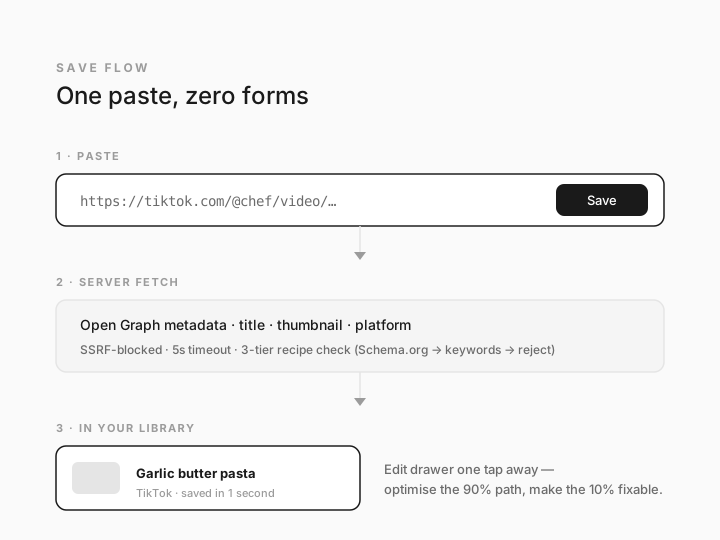
One-step capture
Users paste a link and the system automatically fetches the title, thumbnail, platform, and other metadata—no manual entry.
Safe link fetching
Server-side validation blocks internal/private addresses and suspicious destinations before fetching external content.
Fast failure
A 5-second timeout prevents slow or unresponsive links from blocking the experience.
Recipe validation
Trusted recipe sources are imported directly; unfamiliar links are checked for recipe metadata or cooking-specific content before being accepted.
Decision 2 — Two planner modes, one type-safe store
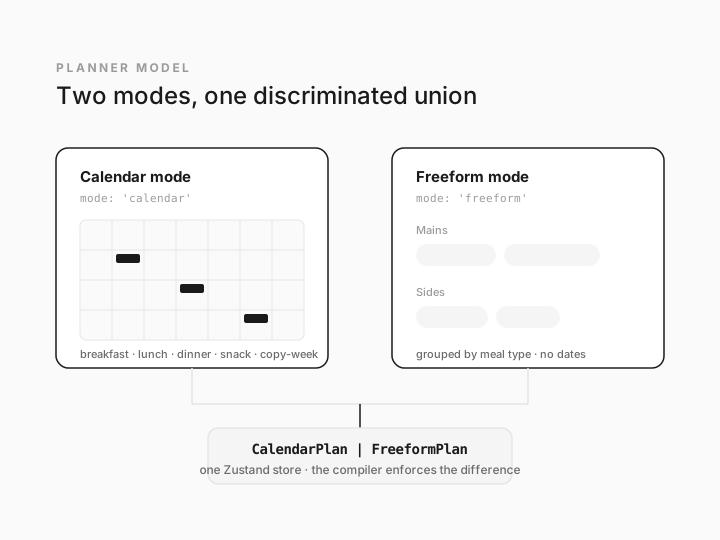
Different planning contexts require different structures
Calendar mode supports recurring weekly meal planning with dates and meal slots, while Freeform mode supports date-independent occasions such as Thanksgiving or a camping trip
Rather than treating them as separate products, I modeled both through a single type-safe planning system, allowing each mode to have only the information and interactions it needs.
Key interaction
Copy-week maps meals by day of week and merges them non-destructively, preventing existing plans from being silently overwritten.
Result
Two distinct planning experiences without duplicating the underlying system—keeping the product flexible while maintaining a consistent architecture.
Development
Tech stack & setup — Built to prototype fast
Stack
Next.js 16 · React 19 · TypeScript · Tailwind v4 · Zustand · Design System · Monorepo
Real components from day one
The design system was integrated as a workspace dependency, so the prototype was built with real, interactive components instead of static mocks. This shortened the gap between design and implementation and made rapid iteration possible.
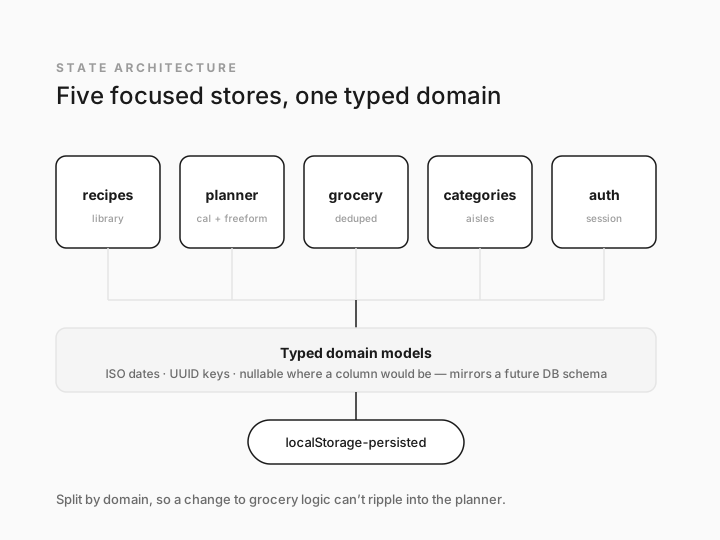
Lightweight, domain-based state
Five focused Zustand stores manage recipes, planning, groceries, categories, and authentication. Keeping state separated by domain makes the prototype easier to evolve without changes in one area cascading into another.
Backend-ready data model
Domain types follow a database-friendly structure—UUIDs, ISO dates, and nullable fields—so the prototype can move from localStorage to a real backend without requiring a major UI rewrite.
Turning the design concept into a working prototype — From foundation to working features
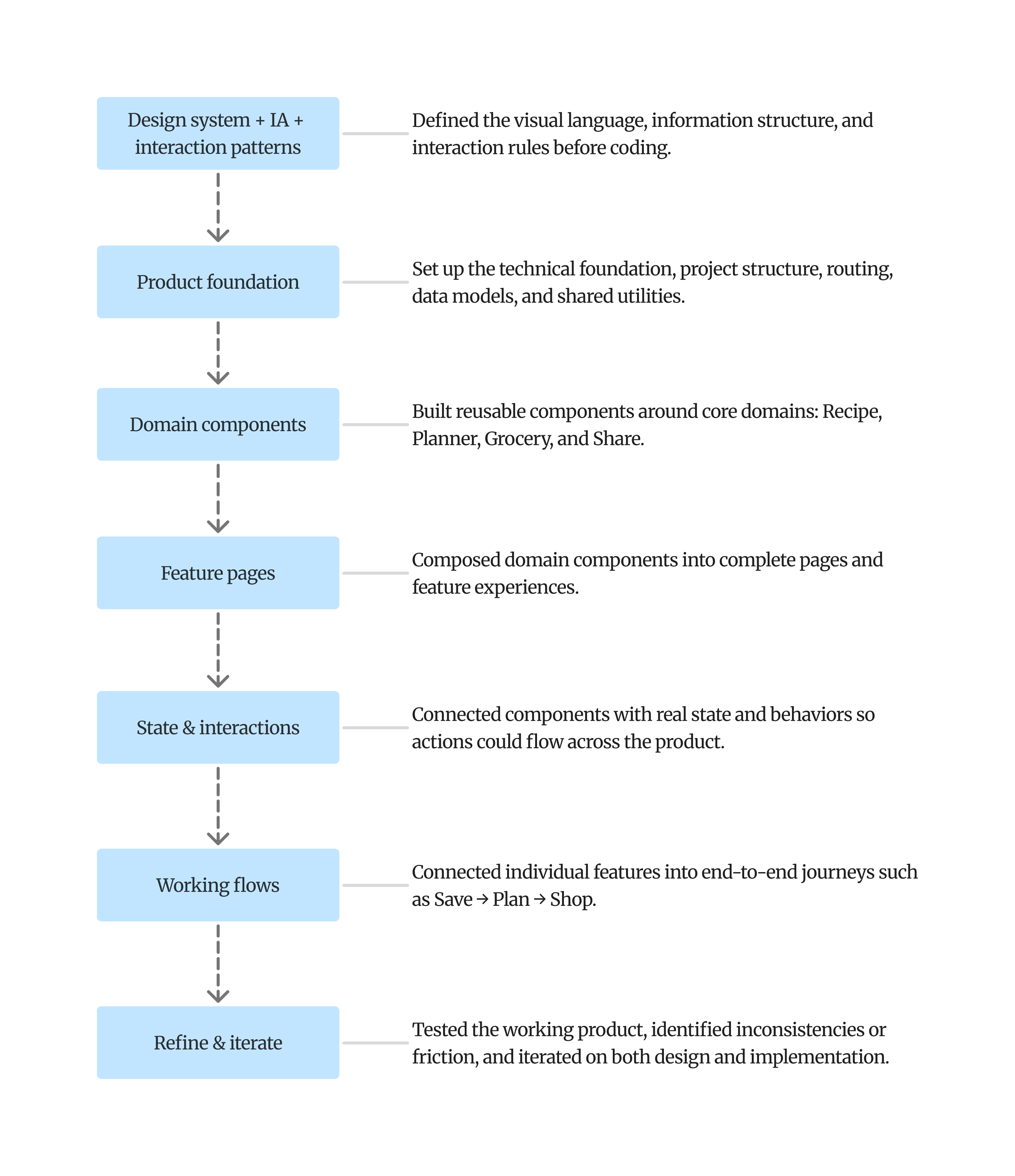
I used Claude Code to translate the defined design patterns, information architecture, and interaction flows into a reusable React foundation. I built the product progressively—from shared components and domain models to feature experiences—then iterated as the flows came together.
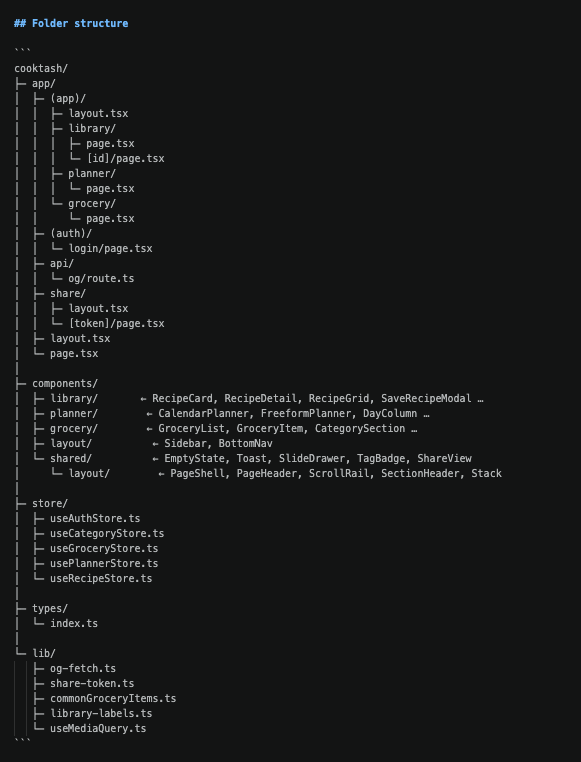
01 — Establish the product foundation
I first established the reusable foundation: design-system components, domain types, routing, and state structure.
The codebase was organized around product domains rather than individual screens, allowing the implementation to mirror the product architecture.
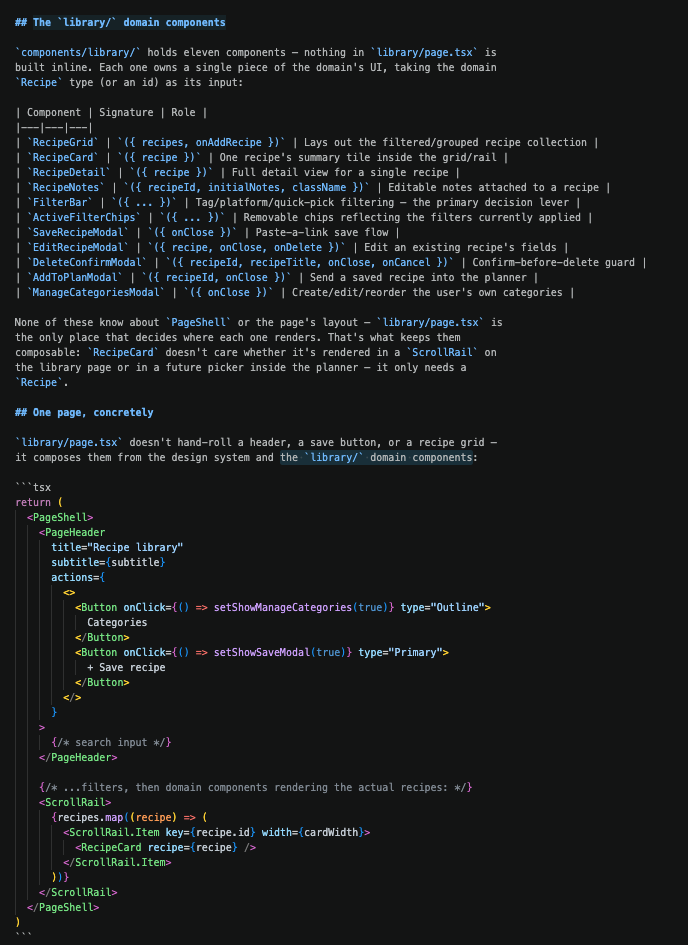
02 — Build features from reusable components
Features were composed from these domain components rather than built as one-off screens.
This kept the implementation consistent with the product's information architecture and made patterns reusable across flows.
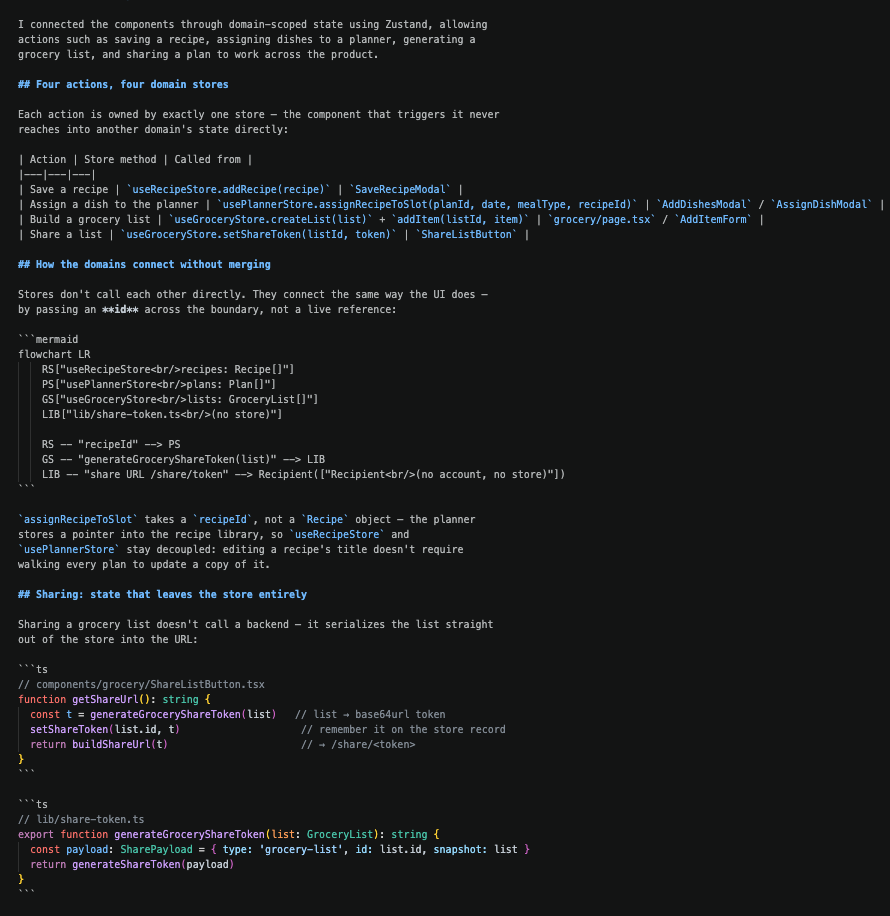
03 — Connect components into real interactions
I connected the components through domain-scoped state using Zustand, allowing actions such as saving a recipe, assigning dishes to a planner, generating a grocery list, and sharing a plan to work across the product.
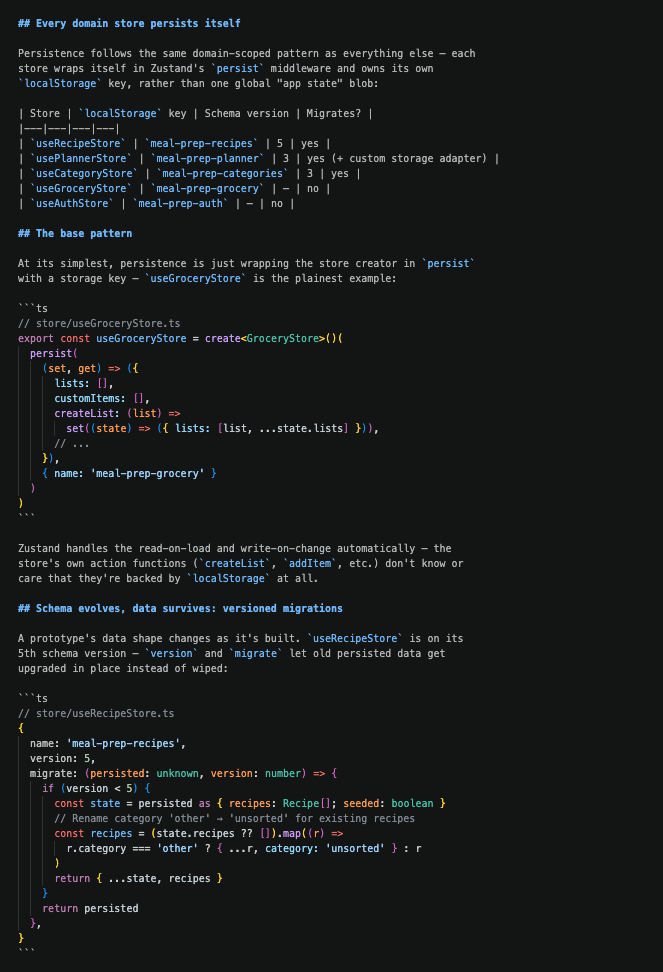
04 — Persist the experience
I persisted domain state locally so recipes, plans, and grocery lists survive page reloads, giving the prototype a realistic product experience without requiring a backend.
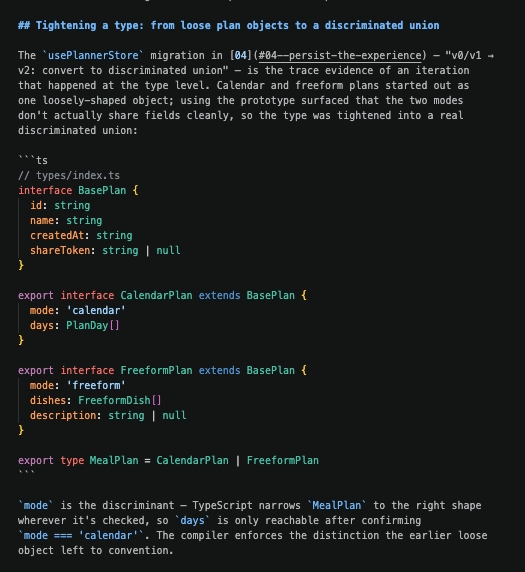
05 — Iterate as the product took shape
As the flows became interactive, I used the working prototype to identify duplicated patterns, unclear interactions, and inconsistencies between features.
I refactored shared components, tightened type definitions, and consolidated recurring interaction patterns as the product evolved.
Outcomes
The MVP highlights
Highlighted features
Zero-typing recipe capture
Paste a link and the recipe lands in the library in about a second — no form. A server-side route resolves Open Graph metadata, blocks internal/private addresses (SSRF protection), and times out at 5 seconds. Unknown domains get a two-tier content check — Schema.org Recipe data, then 3+ cooking-keyword matches — before being accepted.
No-backend sharing
A shared grocery list needs no account and no server round-trip: the list is serialized to JSON, base64url-encoded, and embedded directly in the share URL. The recipient decodes it client-side.
Deduped, aisle-grouped grocery lists
Items are deduplicated by name + category as they’re added, so the same ingredient from two recipes merges into one line instead of listing twice.
Local data that survives schema changes
Recipes, planner, and category state are each on their own versioned migration path (v3–v5) — real users’ existing local data upgrades in place across releases instead of getting wiped.
Save a recipe
simple and quick save with a link, auto fetching recipe metadata.
Library
Every save in one searchable home, filterable by ingredient and source.
Category
Mangage collections according to your interests.
Planner
Pre-structured day slots remove the blank-page decision; copy-week carries a plan forward.
Grocery
Auto-generated, grouped by aisle, duplicates deduped, shareable by one link.
Add Ingredients
Categorized ingredients, easy select and add.
Try the live demo
The full loop is live and interactive — save a recipe, plan a week, create a grocery list, and share it in one link. Click here to try the demo.